预防 OOM
Contents
预防 OOM#
如果程序任务或 actor 用了大量堆内存,可能导致节点内存耗尽(OOM)。当这种情况发生时,操作系统会开始杀死 worker 或 raylet 进程,从而中断应用程序。OOM 也可能导致指标停滞,如果这种情况发生在 head 节点上,可能会导致 仪表盘 或其他控制进程停滞,并导致集群无法使用。
本节中我们将讨论:
内存监视器是什么,它是如何工作的
如何启用和配置
如何使用内存监视器检测和解决内存问题
另请参阅 OOM 调试 以了解如何排除内存不足问题。
什么是内存监视器?#
内存监视器是一个组件,运行在每个节点的 raylet 进程中。它定期检查内存使用情况,包括 worker 堆、对象存储和 raylet,如 memory management 中所述。如果组合使用量超过可配置的阈值,raylet 将杀死一个任务或 actor 进程以释放内存并防止 Ray 失败。
它可以在 Linux 上使用,并且已经在使用 cgroup v1 的容器中运行 Ray 进行了测试。如果在容器外运行内存监视器时遇到问题,或者容器使用 cgroup v2,请 提交问题或提问。
如何禁用内存监视器?#
内存监视器是默认启用的,可以通过在 Ray 启动时将环境变量 RAY_memory_monitor_refresh_ms 设置为零来禁用(例如,RAY_memory_monitor_refresh_ms=0 ray start …)。
如何配置内存监视器?#
内存监控器由以下环境变量控制:
RAY_memory_monitor_refresh_ms (int,默认为 250)`是检查内存使用情况并在需要时终止任务和 actor 的间隔时间。当此值为 0 时,任务终止被禁用。内存监视器每次选择并终止一个任务,并等待任务被终止后再选择另外一个任务,无论内存监视器运行的频率如何。RAY_memory_usage_htreshold (float,默认为 0.95)是节点超出内存容量时的阈值。如果内存使用量超过此分数,它将开始杀死进程以释放内存。范围从 [0, 1]。
使用内存监控器#
重试策略#
当一个任务或 actor 被内存监视器杀死时,它将使用指数回退进行重试。重试延迟有一个上限,为 60 秒。如果任务被内存监视器杀死,它将无限重试(不考虑 max_retries)。如果 actor 被内存监视器杀死,它不会无限重建 actor(它遵守 max_restarts,默认为 0)。
Worker 终止策略#
内存监视器通过确保每个调用者在每个节点上至少有一个任务能够运行来避免任务重试的无限循环。如果无法确保这一点,工作负载将因 OOM 错误而失败。请注意,这仅适用于任务,因为内存监视器不会无限重建 actor。如果工作负载失败,请参考 如何解决内存问题 以调整工作负载使其通过。有关代码示例,请参见下面的 最后一个任务 示例。
当 worker 需要被终止,策略有限考虑可重试的任务,比如,当 max_retries 或 max_restarts 为 > 0。这样做为了最大限度减少工作负载故障。默认情况下,由于 max_restarts 为 0 ,actor 不会进行重试。因此,默认的,任务优先于 actor 被终止。
当有多个调用者创建了任务时,策略将从具有最多运行任务的调用者中选择一个任务。如果两个调用者有相同数量的任务,它将选择最早任务开始时间较晚的调用者。这样做是为了确保公平性并允许每个调用者取得进展。
再同一调用者的任务中,最新启动的任务会被先终止。
下面是一个演示该策略的示例。示例中有一个脚本,它创建了两个任务,而这两个任务又分别创建了四个任务。这些任务被涂上了颜色,每种颜色都构成一个任务“组”,它们属于同一个调用者。
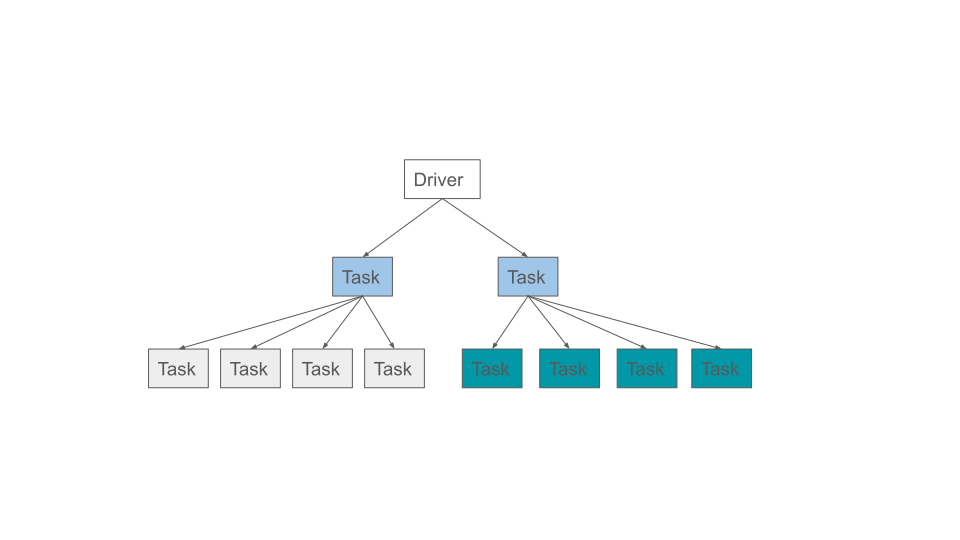
如果此时节点内存不足,它将从调用者中挑选出任务数量最多的任务,并终止最后启动的任务:
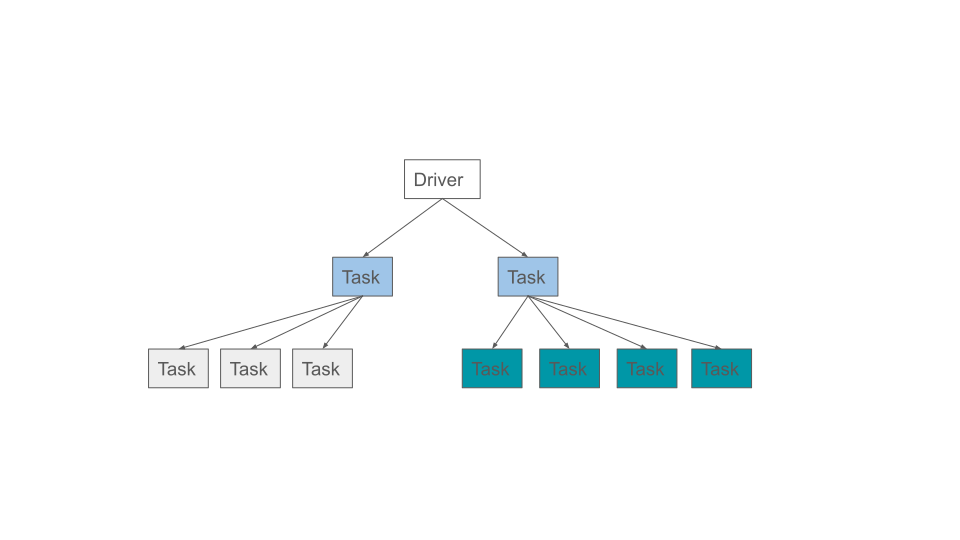
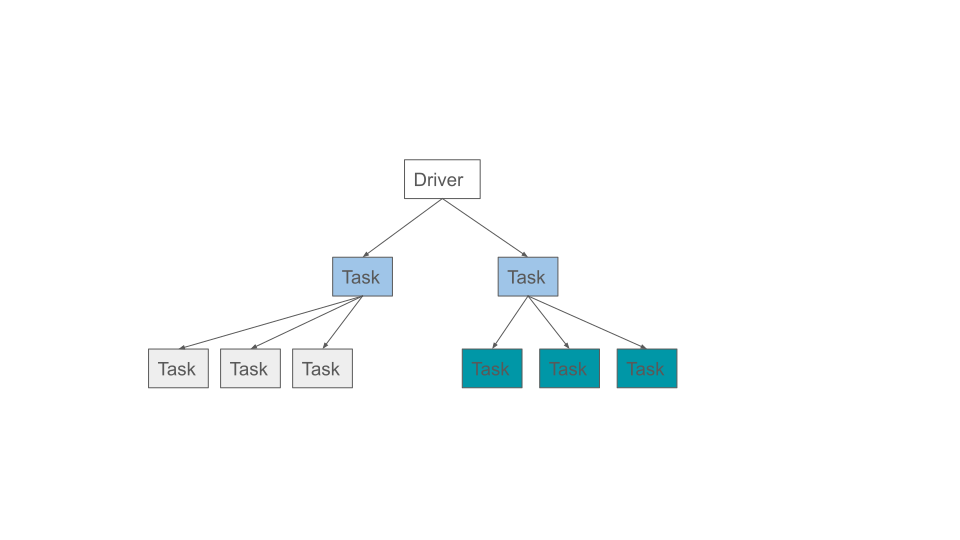
如果此时节点仍然内存不足,则该过程将重复:
示例:如果调用者的最后一个任务被终止,则工作负载将失败
让我们来重建一个应用程序 oom.py,它运行一个需要比可用内存更多的任务。通过将 max_retries 设置为 -1,它被设置为无限重试。
工作终止策略会看到这是调用者的最后一个任务,当终止任务时,它将失败工作负载,即使任务被设置为无限重试。
import ray

@ray.remote(max_retries=-1)
def leaks_memory():
    chunks = []
    bits_to_allocate = 8 * 100 * 1024 * 1024  # ~100 MiB
    while True:
        chunks.append([0] * bits_to_allocate)


try:
    ray.get(leaks_memory.remote())
except ray.exceptions.OutOfMemoryError as ex:
    print("task failed with OutOfMemoryError, which is expected")
设置 RAY_event_stats_print_interval_ms=1000 以便每秒打印一次工作终止摘要,因为默认情况下每分钟打印一次。
RAY_event_stats_print_interval_ms=1000 python oom.py

(raylet) node_manager.cc:3040: 1 Workers (tasks / actors) killed due to memory pressure (OOM), 0 Workers crashed due to other reasons at node (ID: 2c82620270df6b9dd7ae2791ef51ee4b5a9d5df9f795986c10dd219c, IP: 172.31.183.172) over the last time period. To see more information about the Workers killed on this node, use `ray logs raylet.out -ip 172.31.183.172`
(raylet)
(raylet) Refer to the documentation on how to address the out of memory issue: https://docs.ray.io/en/latest/ray-core/scheduling/ray-oom-prevention.html. Consider provisioning more memory on this node or reducing task parallelism by requesting more CPUs per task. To adjust the kill threshold, set the environment variable `RAY_memory_usage_threshold` when starting Ray. To disable worker killing, set the environment variable `RAY_memory_monitor_refresh_ms` to zero.
        task failed with OutOfMemoryError, which is expected
        Verify the task was indeed executed twice via ``task_oom_retry``:
示例:内存监视器倾向于终止可充式的任务
首先启动帮设置 ray 的内存阈值。
RAY_memory_usage_threshold=0.4 ray start --head
让我们创建一个应用程序 two_actors.py,它提交了两个 actor,第一个 actor 是可重试的,第二个 actor 是不可重试的。
from math import ceil
import ray
from ray._private.utils import (
    get_system_memory,
)  # do not use outside of this example as these are private methods.
from ray._private.utils import (
    get_used_memory,
)  # do not use outside of this example as these are private methods.


# estimates the number of bytes to allocate to reach the desired memory usage percentage.
def get_additional_bytes_to_reach_memory_usage_pct(pct: float) -> int:
    used = get_used_memory()
    total = get_system_memory()
    bytes_needed = int(total * pct) - used
    assert (
        bytes_needed > 0
    ), "memory usage is already above the target. Increase the target percentage."
    return bytes_needed


@ray.remote
class MemoryHogger:
    def __init__(self):
        self.allocations = []

    def allocate(self, bytes_to_allocate: float) -> None:
        # divide by 8 as each element in the array occupies 8 bytes
        new_list = [0] * ceil(bytes_to_allocate / 8)
        self.allocations.append(new_list)


first_actor = MemoryHogger.options(
    max_restarts=1, max_task_retries=1, name="first_actor"
).remote()
second_actor = MemoryHogger.options(
    max_restarts=0, max_task_retries=0, name="second_actor"
).remote()

# each task requests 0.3 of the system memory when the memory threshold is 0.4.
allocate_bytes = get_additional_bytes_to_reach_memory_usage_pct(0.3)

first_actor_task = first_actor.allocate.remote(allocate_bytes)
second_actor_task = second_actor.allocate.remote(allocate_bytes)

error_thrown = False
try:
    ray.get(first_actor_task)
except ray.exceptions.OutOfMemoryError as ex:
    error_thrown = True
    print("First started actor, which is retriable, was killed by the memory monitor.")
assert error_thrown

ray.get(second_actor_task)
print("Second started actor, which is not-retriable, finished.")
运行程序可以看到只有第一个 actor 被终止。
$ python two_actors.py

First started actor, which is retriable, was killed by the memory monitor.
Second started actor, which is not-retriable, finished.
内存问题解决方案#
当应用程序因 OOM 失败时,考虑减少任务和 actor 的内存使用量,增加节点的内存容量,或 限制同时运行的任务数量。
问题即讨论?#
你可以通过以下渠道提问、报告问题或者提供反馈:
Discussion Board: For questions about Ray usage or feature requests.
GitHub Issues: For bug reports.
Ray Slack: For getting in touch with Ray maintainers.
StackOverflow: Use the [ray] tag questions about Ray.