占位组
Contents
占位组#
占位组允许用户原子地跨多个节点保留资源组(即,帮派调度)。 然后可以使用他们来调度尽可能靠近的 Ray 任务和 actor 以获得局部性(PACK)或分散(SPREAD)。 占位组通常用于帮派调度 actor,但也支持任务。
以下是一些真实用例:
分布式机器学习训练 分布式训练(诸如:Ray Train 和 Ray Tune)使用占位组 API 来实现帮派调度。在这些设置中,一个试验的所有资源必须同时可用。帮派调度是实现深度学习训练的全有或全无调度的关键技术。
分布式训练的容错能力 占位组可用于配置容错能力。在 Ray Tune 中,将单个试验的相关资源打包在一起可能是有益的,以便节点故障影响较少的试验。在支持弹性训练的库中(例如:XGBoost-Ray),将资源分布在多个节点上有助于确保即使节点死机,训练也会继续进行。
关键概念#
捆绑#
捆绑 是“资源”的结合。它可以是单个资源,{"CPU": 1},也可以是一组资源,{"CPU": 1, "GPU": 4}。
捆绑包是占位组的预留资源。“调度捆绑包”意味着我们找到一个适合捆绑包的节点,并预留捆绑包指定的资源。
捆绑包必须能够适合 Ray 集群上的单个节点。例如,如果您只有一个 8 CPU 节点,并且您有一个需要 {"CPU": 9} 的捆绑包,那么此捆绑包无法调度。
占位组#
占位组 会从集群预留资源。预留资源只能被使用 PlacementGroupSchedulingStrategy 的任务或 actor 使用。
占位组由一串捆绑包组成。例如,
{"CPU": 1} * 4意味着您想要预留 4 个 1 CPU 的捆绑包(即,它预留了 4 个 CPU)。捆绑包然后根据 placement strategies 在集群的节点上放置。
创建占位组后,任务或 actor 可以根据占位组甚至在单个捆绑包上调度。
Create a Placement Group (Reserve Resources) 创建占位组(预留资源) ——————————————–
你可以使用 ray.util.placement_group() 创建占位组。
占位组接受捆绑包列表和 placement strategy。
注意,每个捆绑包必须能够适合 Ray 集群上的单个节点。
例如,如果一个节点只有 8 个 CPU,而您有一个需要 {"CPU": 9} 的捆绑包,那么此捆绑包无法调度。
捆绑包由字典列表指定,例如,[{"CPU": 1}, {"CPU": 1, "GPU": 1}]。
CPU对应于ray.remote中使用的num_cpus。GPU对应于ray.remote中使用的num_gpus。memory对应于ray.remote中使用的memory。其他资源对应于
ray.remote中使用的resources``(例如,``ray.init(resources={"disk": 1})可以有{"disk": 1}的捆绑包)。
占位组调度是异步的。ray.util.placement_group 立即返回。
from pprint import pprint
import time

# Import placement group APIs.
from ray.util.placement_group import (
    placement_group,
    placement_group_table,
    remove_placement_group,
)
from ray.util.scheduling_strategies import PlacementGroupSchedulingStrategy

# Initialize Ray.
import ray

# Create a single node Ray cluster with 2 CPUs and 2 GPUs.
ray.init(num_cpus=2, num_gpus=2)

# Reserve a placement group of 1 bundle that reserves 1 CPU and 1 GPU.
pg = placement_group([{"CPU": 1, "GPU": 1}])
// Initialize Ray.
Ray.init();

// Construct a list of bundles.
Map<String, Double> bundle = ImmutableMap.of("CPU", 1.0);
List<Map<String, Double>> bundles = ImmutableList.of(bundle);

// Make a creation option with bundles and strategy.
PlacementGroupCreationOptions options =
  new PlacementGroupCreationOptions.Builder()
    .setBundles(bundles)
    .setStrategy(PlacementStrategy.STRICT_SPREAD)
    .build();

PlacementGroup pg = PlacementGroups.createPlacementGroup(options);
// Initialize Ray.
ray::Init();

// Construct a list of bundles.
std::vector<std::unordered_map<std::string, double>> bundles{{{"CPU", 1.0}}};

// Make a creation option with bundles and strategy.
ray::internal::PlacementGroupCreationOptions options{
    false, "my_pg", bundles, ray::internal::PlacementStrategy::PACK};

ray::PlacementGroup pg = ray::CreatePlacementGroup(options);
你可以使用以下两个 API 之一阻塞程序,直到占位组准备就绪:
# Wait until placement group is created.
ray.get(pg.ready(), timeout=10)

# You can also use ray.wait.
ready, unready = ray.wait([pg.ready()], timeout=10)

# You can look at placement group states using this API.
print(placement_group_table(pg))
// Wait for the placement group to be ready within the specified time(unit is seconds).
boolean ready = pg.wait(60);
Assert.assertTrue(ready);

// You can look at placement group states using this API.
List<PlacementGroup> allPlacementGroup = PlacementGroups.getAllPlacementGroups();
for (PlacementGroup group: allPlacementGroup) {
  System.out.println(group);
}
// Wait for the placement group to be ready within the specified time(unit is seconds).
bool ready = pg.Wait(60);
assert(ready);

// You can look at placement group states using this API.
std::vector<ray::PlacementGroup> all_placement_group = ray::GetAllPlacementGroups();
for (const ray::PlacementGroup &group : all_placement_group) {
  std::cout << group.GetName() << std::endl;
}
让我们验证占位组已成功创建。
# This API is only available when you download Ray via `pip install "ray[default]"`
ray list placement-groups
======== List: 2023-04-07 01:15:05.682519 ========
Stats:
------------------------------
Total: 1

Table:
------------------------------
    PLACEMENT_GROUP_ID                    NAME      CREATOR_JOB_ID  STATE
0  3cd6174711f47c14132155039c0501000000                  01000000  CREATED
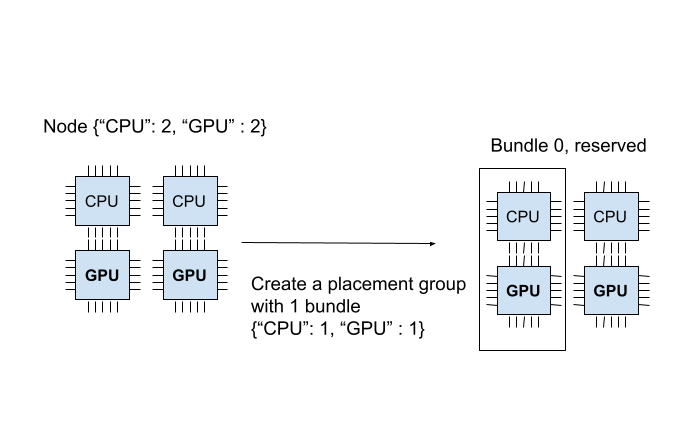
占位组成功创建。在 {"CPU": 2, "GPU": 2} 资源中,占位组预留了 {"CPU": 1, "GPU": 1}。
预留的资源只能在调度任务或 actor 时使用占位组。
下图展示了占位组预留的 “1 CPU 和 1 GPU” 捆绑包。
占位组是自动创建的;如果一个捆绑包无法适合当前节点,整个占位组将无法准备就绪,也不会预留资源。
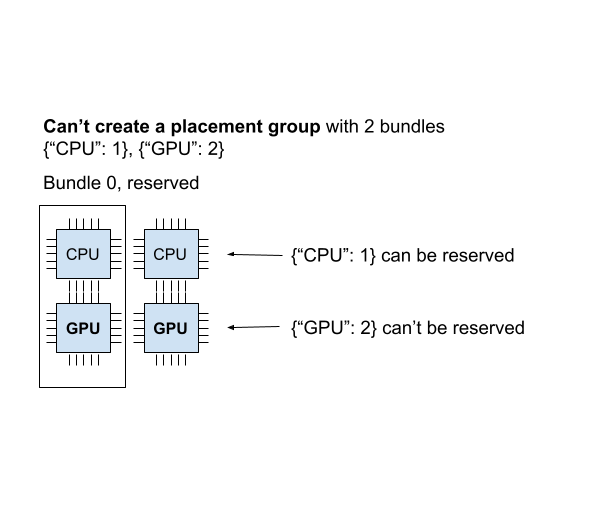
为了说明这一点,让我们创建另一个需要 {"CPU":1}, {"GPU": 2} 的占位组(2 个捆绑包)。
# Cannot create this placement group because we
# cannot create a {"GPU": 2} bundle.
pending_pg = placement_group([{"CPU": 1}, {"GPU": 2}])
# This raises the timeout exception!
try:
    ray.get(pending_pg.ready(), timeout=5)
except Exception as e:
    print(
        "Cannot create a placement group because "
        "{'GPU': 2} bundle cannot be created."
    )
    print(e)
你可以验证新的占位组正在等待创建。
# This API is only available when you download Ray via `pip install "ray[default]"`
ray list placement-groups
======== List: 2023-04-07 01:16:23.733410 ========
Stats:
------------------------------
Total: 2

Table:
------------------------------
    PLACEMENT_GROUP_ID                    NAME      CREATOR_JOB_ID  STATE
0  3cd6174711f47c14132155039c0501000000                  01000000  CREATED
1  e1b043bebc751c3081bddc24834d01000000                  01000000  PENDING <---- the new placement group.
你还可以使用 ray status CLI 命令验证 {"CPU": 1, "GPU": 2} 捆绑包无法分配。
ray status
Resources
---------------------------------------------------------------
Usage:
0.0/2.0 CPU (0.0 used of 1.0 reserved in placement groups)
0.0/2.0 GPU (0.0 used of 1.0 reserved in placement groups)
0B/3.46GiB memory
0B/1.73GiB object_store_memory

Demands:
{'CPU': 1.0} * 1, {'GPU': 2.0} * 1 (PACK): 1+ pending placement groups <--- 1 placement group is pending creation.
当前集群有 {"CPU": 2, "GPU": 2}。我们已经创建了一个 {"CPU": 1, "GPU": 1} 捆绑包,所以集群中只剩下 {"CPU": 1, "GPU": 1}。
如果创建两个捆绑包 {"CPU": 1}, {"GPU": 2},我们可以成功创建第一个捆绑包,但无法调度第二个捆绑包。
由于我们无法在集群上创建每个捆绑包,占位组未创建,包括 {"CPU": 1} 捆绑包。
当占位组以任何方式调度是,它被称为“不可行”。
想象一下,您调度 {"CPU": 4} 捆绑包,但您只有一个具有 2 个 CPU 的节点。在您的集群中无法创建此捆绑包。
Ray 自动调度器会自动扩展集群,以确保可以根据需要放置挂起的组。
如果 Ray Autoscaler 无法提供资源来调度置放组,Ray 不会 打印有关不可行组以及使用这些组的任务和 actor 的警告。 你可以从 dashboard 或状态 API 观察占位组的调度状态。
将任务和 actor 调度到占位组(使用预留资源)#
上一节中,我们创建了一个占位组,从一个 2 CPU 和 2 GPU 的节点中预留了 {"CPU": 1, "GPU: 1"}。
现在让我们将 actor 调度到占位组中。
你可以使用 options(scheduling_strategy=PlacementGroupSchedulingStrategy(...)) 来调度 actor 或任务到占位组。
@ray.remote(num_cpus=1)
class Actor:
    def __init__(self):
        pass

    def ready(self):
        pass


# Create an actor to a placement group.
actor = Actor.options(
    scheduling_strategy=PlacementGroupSchedulingStrategy(
        placement_group=pg,
    )
).remote()

# Verify the actor is scheduled.
ray.get(actor.ready.remote(), timeout=10)
public static class Counter {
  private int value;

  public Counter(int initValue) {
    this.value = initValue;
  }

  public int getValue() {
    return value;
  }

  public static String ping() {
    return "pong";
  }
}

// Create GPU actors on a gpu bundle.
for (int index = 0; index < 1; index++) {
  Ray.actor(Counter::new, 1)
    .setPlacementGroup(pg, 0)
    .remote();
}
class Counter {
public:
  Counter(int init_value) : value(init_value){}
  int GetValue() {return value;}
  std::string Ping() {
    return "pong";
  }
private:
  int value;
};

// Factory function of Counter class.
static Counter *CreateCounter() {
  return new Counter();
};

RAY_REMOTE(&Counter::Ping, &Counter::GetValue, CreateCounter);

// Create GPU actors on a gpu bundle.
for (int index = 0; index < 1; index++) {
  ray::Actor(CreateCounter)
    .SetPlacementGroup(pg, 0)
    .Remote(1);
}
Note
但你使用带有占位组的 actor,请始终指定 num_cpus。
当你不指定(例如,num_cpus=0)时,占位组选项被忽略,任务和 actor 不使用预留资源。
注意默认的情况下(没有传递参数给 ray.remote),
Ray 任务需要 1 个 CPU
Ray actor 需要在调度后需要 1 个 CPU。但在创建后,它占用 0 个 CPU。
当调度一个无需资源和需要占位组的 actor,占位组必须被创建(因为它需要 1 个 CPU 来调度)。 但是,当 actor 被调度时,它会使用占位组的资源。
actor 现在已调度!一个捆绑包可以被多个任务和 actor 使用(即,捆绑包到任务(或 actor)是一对多的关系)。
这种情况下,由于 actor 使用 1 个 CPU,1 个 CPU 会从捆绑包被占用。你可以从 CLI 命令 ray status 验证这一点。
你能看到 1 个 CPU 被占位组预留,1.0 被使用(由我们创建的 actor)。
ray status
Resources
---------------------------------------------------------------
Usage:
1.0/2.0 CPU (1.0 used of 1.0 reserved in placement groups) <---
0.0/2.0 GPU (0.0 used of 1.0 reserved in placement groups)
0B/4.29GiB memory
0B/2.00GiB object_store_memory

Demands:
(no resource demands)
你也可以使用 ray list actors 验证 actor 已创建。
# This API is only available when you download Ray via `pip install "ray[default]"`
ray list actors --detail
-   actor_id: b5c990f135a7b32bfbb05e1701000000
    class_name: Actor
    death_cause: null
    is_detached: false
    job_id: '01000000'
    name: ''
    node_id: b552ca3009081c9de857a31e529d248ba051a4d3aeece7135dde8427
    pid: 8795
    placement_group_id: d2e660ac256db230dbe516127c4a01000000 <------
    ray_namespace: e5b19111-306c-4cd8-9e4f-4b13d42dff86
    repr_name: ''
    required_resources:
        CPU_group_d2e660ac256db230dbe516127c4a01000000: 1.0
    serialized_runtime_env: '{}'
    state: ALIVE
由于还有 1 个 GPU,让我们创建一个需要 1 个 GPU 的新 actor。
这次,我们还指定了 placement_group_bundle_index。在占位组中,每个捆绑包都有一个“索引”。
比如,一个包含 2 个捆绑包的占位组 [{"CPU": 1}, {"GPU": 1}] 有索引 0 捆绑包 {"CPU": 1} 和索引 1 捆绑包 {"GPU": 1}。
由于我们只有 1 个捆绑包,我们只有索引 0。如果你不指定捆绑包,actor(或任务)将被调度到一个具有未分配预留资源的随机捆绑包。
@ray.remote(num_cpus=0, num_gpus=1)
class Actor:
    def __init__(self):
        pass

    def ready(self):
        pass


# Create a GPU actor on the first bundle of index 0.
actor2 = Actor.options(
    scheduling_strategy=PlacementGroupSchedulingStrategy(
        placement_group=pg,
        placement_group_bundle_index=0,
    )
).remote()

# Verify that the GPU actor is scheduled.
ray.get(actor2.ready.remote(), timeout=10)
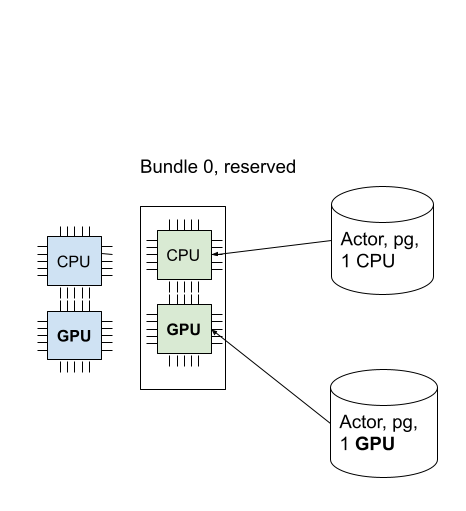
我们成功调度了 GPU actor!下图描述了调度到占位组中的 2 个 actor。
你可以使用 ray status 命令验证所有预留资源都被使用。
ray status
Resources
---------------------------------------------------------------
Usage:
1.0/2.0 CPU (1.0 used of 1.0 reserved in placement groups)
1.0/2.0 GPU (1.0 used of 1.0 reserved in placement groups) <----
0B/4.29GiB memory
0B/2.00GiB object_store_memory
占位策略#
占位组提供的一个功能是在捆绑包之间添加放置约束。
比如,你想要将捆绑包放置在同一个节点上,或者尽可能地分散到多个节点上。你可以通过 strategy 参数指定策略。
这样,你可以确保你的 actor 和任务可以根据某些放置约束调度进行调度。
这个示例使用了 PACK 策略创建了一个捆绑包,两个捆绑包必须在同一个节点上创建。
注意,这是一个软策略。如果捆绑包无法放置在单个节点上,它们将分散到其他节点。
如果你不想遇到这个问题,你可以使用 STRICT_PACK 策略,如果无法满足放置要求,它将无法创建占位组。
# Reserve a placement group of 2 bundles
# that have to be packed on the same node.
pg = placement_group([{"CPU": 1}, {"GPU": 1}], strategy="PACK")
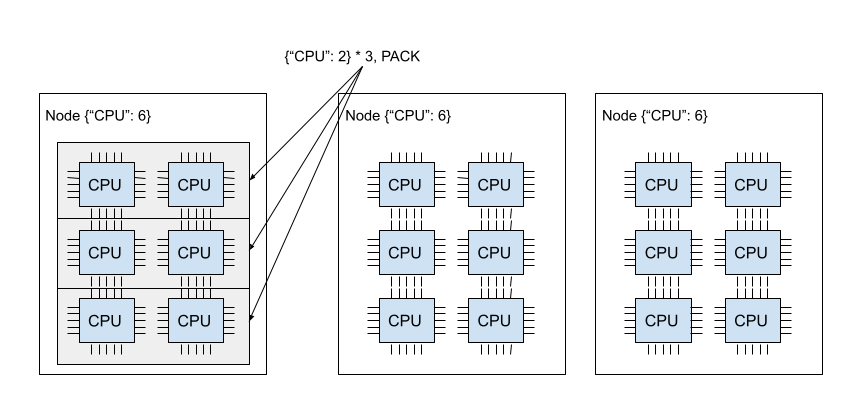
下图演示了 PACK 策略。三个 {"CPU": 2} 捆绑包位于同一节点上。
下图演示了 SPREAD 策略。三个 {"CPU": 2} 捆绑包位于三个不同的节点上。
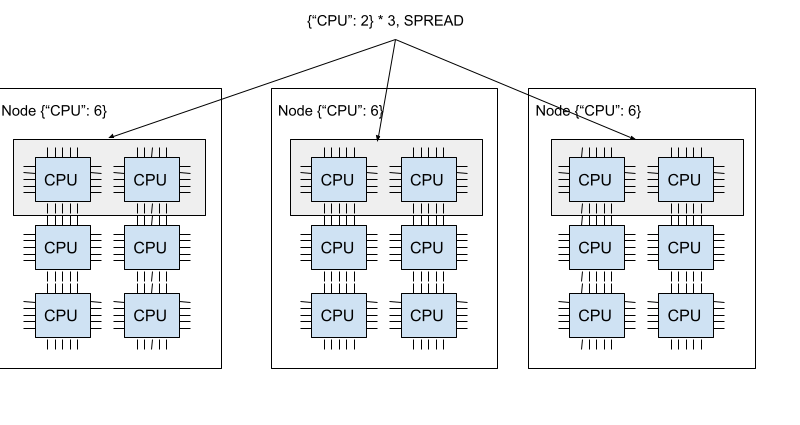
Ray 支持四种占位组策略。默认调度策略是 PACK。
STRICT_PACK
所有的捆绑包必须放置在集群上的单个节点上。当你想要最大化局部性时使用此策略。
PACK
所有提供的捆绑包尽可能地放置在单个节点上。 如果无法严格打包(即,某些捆绑包无法放置在节点上),捆绑包可以放置在其他节点上。
STRICT_SPREAD
每个捆绑包必须放置在不同的节点上。
SPREAD
每个捆绑包尽可能地分散到不同的节点上。 如果无法严格分散(即,某些捆绑包无法放置在不同的节点上),捆绑包可以放置在重叠的节点上。
移除占位组(释放预留资源)#
默认的,占位组的生命周期是由创建占位组的驱动程序控制的(除非你将其设置为 detached placement group)。
当占位组是从一个 detached actor 创建的,生命周期是由分离的 actor 控制的。
在 Ray,驱动程序是调用 ray.init 的 Python 脚本。
当创建占位组的驱动程序或分离的 actor 退出,预留资源(捆绑包)从占位组中被释放。
要手动释放预留资源,使用 remove_placement_group API(这也是一个异步 API)。
Note
当您删除占位组时,仍然使用预留资源的 actor 或任务将被强制终止。
# This API is asynchronous.
remove_placement_group(pg)

# Wait until placement group is killed.
time.sleep(1)
# Check that the placement group has died.
pprint(placement_group_table(pg))

"""
{'bundles': {0: {'GPU': 1.0}, 1: {'CPU': 1.0}},
'name': 'unnamed_group',
'placement_group_id': '40816b6ad474a6942b0edb45809b39c3',
'state': 'REMOVED',
'strategy': 'PACK'}
"""
PlacementGroups.removePlacementGroup(placementGroup.getId());

PlacementGroup removedPlacementGroup = PlacementGroups.getPlacementGroup(placementGroup.getId());
Assert.assertEquals(removedPlacementGroup.getState(), PlacementGroupState.REMOVED);
ray::RemovePlacementGroup(placement_group.GetID());

ray::PlacementGroup removed_placement_group = ray::GetPlacementGroup(placement_group.GetID());
assert(removed_placement_group.GetState(), ray::PlacementGroupState::REMOVED);
观察并调试占位组#
Ray 提供了几个有用的工具来检查占位组状态和资源使用。
Ray Status 是一个 CLI 工具,用于查看占位组的资源使用情况和调度资源需求。
Ray 面板 是一个 UI 工具,用于检查占位组状态。
Ray 状态 API 是一个 CLI,用于检查占位组状态。
ray status CLI 命令行工具提供集群的自动缩放状态。
它提供了未调度的占位组的“资源需求”以及资源预留状态。
Resources
---------------------------------------------------------------
Usage:
1.0/2.0 CPU (1.0 used of 1.0 reserved in placement groups)
0.0/2.0 GPU (0.0 used of 1.0 reserved in placement groups)
0B/4.29GiB memory
0B/2.00GiB object_store_memory
Ray 任务视图 提供了占位组表,显示了占位组的调度状态和元数据。
Note
Ray 面板只能在您使用 pip install "ray[default]" 安装 Ray 时使用。
Ray state API 是一个 CLI 工具,用于检查 Ray 资源(任务、actor、占位组等)的状态。
ray list placement-groups 提供了占位组的元数据和调度状态。
ray list placement-groups --detail 提供了更详细的统计信息和调度状态。
Note
状态 API 仅在您使用 pip install "ray[default]" 安装 Ray 时可用。
检查占位组调度状态#
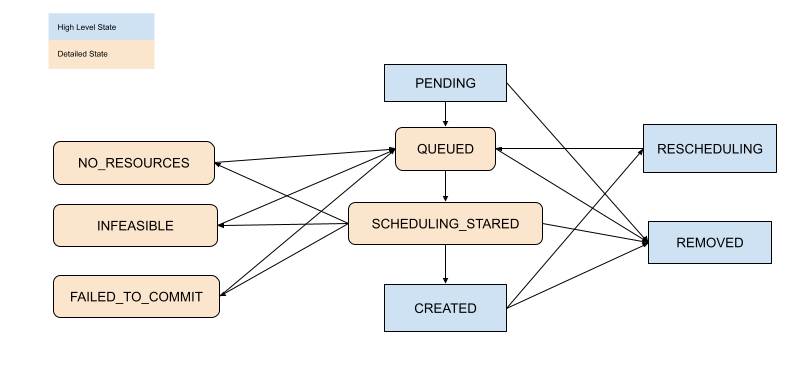
通过以上工具,你可以查看占位组的状态。状态的定义在以下文件中指定:
[高级] 子任务和 Actor#
默认的,子 actor 和任务不共享父 actor 使用的占位组。
要自动将子 actor 或任务调度到相同的占位组,将 placement_group_capture_child_tasks 设置为 True。
import ray
from ray.util.placement_group import placement_group
from ray.util.scheduling_strategies import PlacementGroupSchedulingStrategy

ray.init(num_cpus=2)

# Create a placement group.
pg = placement_group([{"CPU": 2}])
ray.get(pg.ready())


@ray.remote(num_cpus=1)
def child():
    import time

    time.sleep(5)


@ray.remote(num_cpus=1)
def parent():
    # The child task is scheduled to the same placement group as its parent,
    # although it didn't specify the PlacementGroupSchedulingStrategy.
    ray.get(child.remote())


# Since the child and parent use 1 CPU each, the placement group
# bundle {"CPU": 2} is fully occupied.
ray.get(
    parent.options(
        scheduling_strategy=PlacementGroupSchedulingStrategy(
            placement_group=pg, placement_group_capture_child_tasks=True
        )
    ).remote()
)
还未实现 Java API。
当 placement_group_capture_child_tasks 为 True 时,但你不想将子任务和 actor 调度到相同的占位组时,指定 PlacementGroupSchedulingStrategy(placement_group=None)。
@ray.remote
def parent():
    # In this case, the child task isn't
    # scheduled with the parent's placement group.
    ray.get(
        child.options(
            scheduling_strategy=PlacementGroupSchedulingStrategy(placement_group=None)
        ).remote()
    )


# This times out because we cannot schedule the child task.
# The cluster has {"CPU": 2}, and both of them are reserved by
# the placement group with a bundle {"CPU": 2}. Since the child shouldn't
# be scheduled within this placement group, it cannot be scheduled because
# there's no available CPU resources.
try:
    ray.get(
        parent.options(
            scheduling_strategy=PlacementGroupSchedulingStrategy(
                placement_group=pg, placement_group_capture_child_tasks=True
            )
        ).remote(),
        timeout=5,
    )
except Exception as e:
    print("Couldn't create a child task!")
    print(e)
【高级】命名占位组#
可以给占位组一个全局唯一的名字。
这允许您从 Ray 集群中的任何作业中检索占位组。
如果您无法直接将占位组句柄传递给需要它的 actor 或任务,或者正在尝试访问另一个驱动程序启动的占位组,这可能很有用。
注意,如果占位组的生命周期不是 detached,它仍然会被销毁。
# first_driver.py
# Create a placement group with a global name.
pg = placement_group([{"CPU": 1}], name="global_name")
ray.get(pg.ready())

# second_driver.py
# Retrieve a placement group with a global name.
pg = ray.util.get_placement_group("global_name")
// Create a placement group with a unique name.
Map<String, Double> bundle = ImmutableMap.of("CPU", 1.0);
List<Map<String, Double>> bundles = ImmutableList.of(bundle);

PlacementGroupCreationOptions options =
  new PlacementGroupCreationOptions.Builder()
    .setBundles(bundles)
    .setStrategy(PlacementStrategy.STRICT_SPREAD)
    .setName("global_name")
    .build();

PlacementGroup pg = PlacementGroups.createPlacementGroup(options);
pg.wait(60);

...

// Retrieve the placement group later somewhere.
PlacementGroup group = PlacementGroups.getPlacementGroup("global_name");
Assert.assertNotNull(group);
// Create a placement group with a globally unique name.
std::vector<std::unordered_map<std::string, double>> bundles{{{"CPU", 1.0}}};

ray::PlacementGroupCreationOptions options{
    true/*global*/, "global_name", bundles, ray::PlacementStrategy::STRICT_SPREAD};

ray::PlacementGroup pg = ray::CreatePlacementGroup(options);
pg.Wait(60);

...

// Retrieve the placement group later somewhere.
ray::PlacementGroup group = ray::GetGlobalPlacementGroup("global_name");
assert(!group.Empty());
我们也支持 C++ 中的非全局命名的占位组,这意味着占位组名称仅在作业内有效,不能从另一个作业中访问。
// Create a placement group with a job-scope-unique name.
std::vector<std::unordered_map<std::string, double>> bundles{{{"CPU", 1.0}}};

ray::PlacementGroupCreationOptions options{
    false/*non-global*/, "non_global_name", bundles, ray::PlacementStrategy::STRICT_SPREAD};

ray::PlacementGroup pg = ray::CreatePlacementGroup(options);
pg.Wait(60);

...

// Retrieve the placement group later somewhere in the same job.
ray::PlacementGroup group = ray::GetPlacementGroup("non_global_name");
assert(!group.Empty());
【高级】 分离占位组#
默认的,占位组的生命周期属于驱动程序和 actor。
如果占位组是从驱动程序创建的,当驱动程序终止时它将被销毁。
如果占位组是从一个分离的 actor 创建的,当分离的 actor 被杀死它将被杀死。
要保持占位组的生命周期与其作业或分离的 actor 无关,请指定 lifetime="detached"。例如:
# driver_1.py
# Create a detached placement group that survives even after
# the job terminates.
pg = placement_group([{"CPU": 1}], lifetime="detached", name="global_name")
ray.get(pg.ready())
Java API 尚未实现生命周期参数。
让我们终止当前脚本并启动一个新的 Python 脚本。调用 ray list placement-groups,你会看到占位组没有被删除。
注意,生命周期选项与名称无关。如果我们只指定了名称而没有指定 lifetime="detached",那么占位组只能在原始驱动程序仍在运行时检索。
建议在创建分离的占位组时始终指定名称。
[高级] 容错#
在 Dead 节点重新调度捆绑包#
如果节点上包含占位组的某些捆绑包的节点死机,所有捆绑包都将通过 GCS(例如:尝试再次分配资源) 在不同的节点上重新调度。 这意味着占位组的初始创建是“原子的”,但一旦创建,可能会出现部分占位组。 重新调度捆绑包比其他占位组调度具有更高的调度优先级。
为部分丢失的捆绑包提供资源#
如果没有足够的资源来调度部分丢失的捆绑包,占位组将等待,假设 Ray Autoscaler 将启动一个新节点来满足资源需求。 如果无法提供额外的资源(例如,您不使用 Autoscaler 或 Autoscaler 达到资源限制),占位组将无限期地保持部分创建状态。
使用捆绑包的任务和 actor 的容错能力#
一旦捆绑包恢复,使用任务和 actor 的捆绑包(预留资源)将根据其 fault tolerant policy 重新调度。