什么是 Ray Core?
Contents
什么是 Ray Core?#
Ray Core 为构建和扩展分布式应用程序提供了少量的核心基元(即 task、actor、对象)。下面我们将介绍一些简单的示例,这些示例向您展示如何将函数和类轻松地转换为 Ray task 和 actor,以及如何使用 Ray 对象。
入门#
要开始,请通过 pip-install-U Ray 安装 Ray。有关更多安装选项,请参阅:安装 Ray。以下几节将介绍使用 Ray Core 的基本知识。
第一步导入并实例化 Ray:
import ray

ray.init()
Note
Ray 在最近的版本 (>=1.5), ray.init() 在第一个 Ray 远程 API 调用时会自动执行。
运行一个任务#
Ray 将你的函数作为集群远程任务。为此,你需要使用 @ray.remote 装饰你的函数,以声明你想要远程运行这个函数。
然后,你使用 .remote() 而不是通常调用方式。
这个远程调用返回一个 future,一个所谓的 Ray 对象引用,你可以使用 ray.get 获取它:
# Define the square task.
@ray.remote
def square(x):
    return x * x

# Launch four parallel square tasks.
futures = [square.remote(i) for i in range(4)]

# Retrieve results.
print(ray.get(futures))
# -> [0, 1, 4, 9]
Actor 调用#
Ray 提供了 actor 来允许您在多个 actor 实例之间并行计算。当您实例化一个 Ray actor 类时,Ray 将在集群中启动该类的远程实例。这个 actor 之后可以执行远程方法调用并维护自己的内部状态:
# Define the Counter actor.
@ray.remote
class Counter:
    def __init__(self):
        self.i = 0

    def get(self):
        return self.i

    def incr(self, value):
        self.i += value

# Create a Counter actor.
c = Counter.remote()

# Submit calls to the actor. These calls run asynchronously but in
# submission order on the remote actor process.
for _ in range(10):
    c.incr.remote(1)

# Retrieve final actor state.
print(ray.get(c.get.remote()))
# -> 10
上面的内容涵盖了非常基本的 actor 使用。要了解更深入的示例,包括如何同时使用任务和 actor,请查看 Monte Carlo Estimation of π。
对象传递#
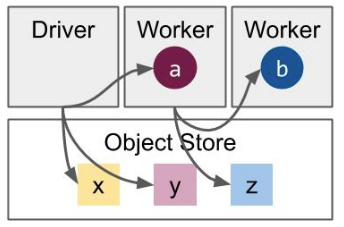
如上所述,Ray 将任务和 actor 调用结果存储在其 分布式对象存储 中,返回 对象引用,稍后可以检索。对象引用也可以通过 ray.put 明确创建,对象引用可以作为参数值的替代传递给任务:
import numpy as np

# Define a task that sums the values in a matrix.
@ray.remote
def sum_matrix(matrix):
    return np.sum(matrix)

# Call the task with a literal argument value.
print(ray.get(sum_matrix.remote(np.ones((100, 100)))))
# -> 10000.0

# Put a large array into the object store.
matrix_ref = ray.put(np.ones((1000, 1000)))

# Call the task with the object reference as an argument.
print(ray.get(sum_matrix.remote(matrix_ref)))
# -> 1000000.0
下一步#
Tip
要检查你的程序当前的运行情况,可以使用 Ray 控制面板。
Ray 的核心基础很简单,但可以组合在一起表达几乎任何类型的分布式计算。 通过以下用户指南学习更多关于 Ray 的 核心概念 :