反模式:使用 ray.get 一次获取太多对象导致失败
Contents
反模式:使用 ray.get 一次获取太多对象导致失败#
TLDR: 避免使用 ray.get() 一次获取太多对象,因为这会导致堆内存不足或对象存储空间不足。相反,一次获取并处理一个批次。
如果您有大量的任务要并行运行,尝试一次性对所有任务执行 ray.get() 可能会导致堆内存不足或对象存储空间不足,因为 Ray 需要同时将所有对象提取到调用方。
相反,您应该一次获取并处理一个批次的结果。一旦处理了一个批次,Ray 将清除该批次中的对象,以为将来的批次腾出空间。
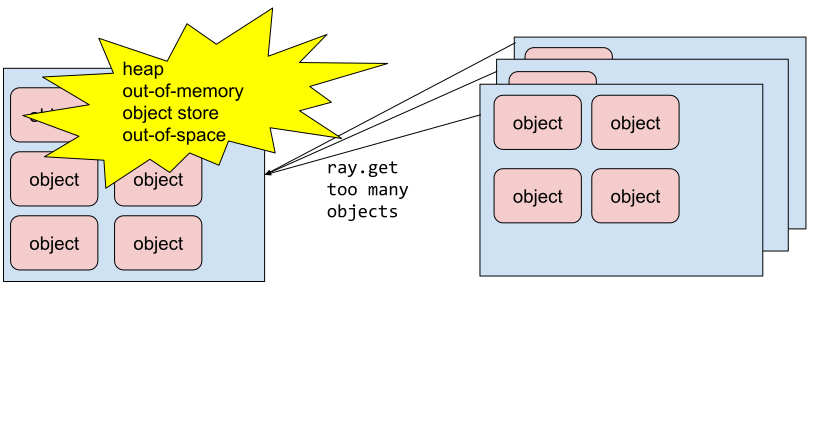
ray.get() 一次获取太多对象#
代码示例#
反模式:
import ray
import numpy as np

ray.init()


def process_results(results):
    # custom process logic
    pass


@ray.remote
def return_big_object():
    return np.zeros(1024 * 10)


NUM_TASKS = 1000

object_refs = [return_big_object.remote() for _ in range(NUM_TASKS)]
# This will fail with heap out-of-memory
# or object store out-of-space if NUM_TASKS is large enough.
results = ray.get(object_refs)
process_results(results)
更好的方法:
BATCH_SIZE = 100

while object_refs:
    # Process results in the finish order instead of the submission order.
    ready_object_refs, object_refs = ray.wait(object_refs, num_returns=BATCH_SIZE)
    # The node only needs enough space to store
    # a batch of objects instead of all objects.
    results = ray.get(ready_object_refs)
    process_results(results)
这里除了一次获取一个批次以避免失败之外,我们还使用 ray.wait() 以完成顺序而不是提交顺序处理结果,以减少运行时间。有关更多详细信息,请参见 反模式:使用 ray.get 按提交顺序处理结果会增加运行时间。