RLlib 入门
Contents
Note
From Ray 2.6.0 onwards, RLlib is adopting a new stack for training and model customization, gradually replacing the ModelV2 API and some convoluted parts of Policy API with the RLModule API. Click here for details.
RLlib 入门#
At a high level, RLlib provides you with an Algorithm class which
holds a policy for environment interaction.
Through the algorithm’s interface, you can train the policy compute actions, or store
your algorithms.
In multi-agent training, the algorithm manages the querying
and optimization of multiple policies at once.
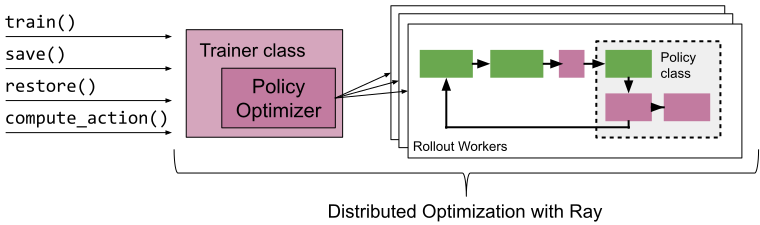
In this guide, we will first walk you through running your first experiments with the RLlib CLI, and then discuss our Python API in more detail.
Using the RLlib CLI#
The quickest way to run your first RLlib algorithm is to use the command line interface. You can train DQN with the following commands:
Note that you choose any supported RLlib algorithm (--algo) and environment (--env).
RLlib supports any Farama-Foundation Gymnasium environment, as well as a number of other environments
(see 环境).
It also supports a large number of algorithms (see 算法) to
choose from.
Running the above will return one of the checkpoints that get generated during training after 30 training iterations,
as well as a command that you can use to evaluate the trained algorithm.
You can evaluate the trained algorithm with the following command (assuming the checkpoint path is called checkpoint):
Note
By default, the results will be logged to a subdirectory of ~/ray_results.
This subdirectory will contain a file params.json which contains the
hyper-parameters, a file result.json which contains a training summary
for each episode and a TensorBoard file that can be used to visualize
training process with TensorBoard by running
tensorboard --logdir=~/ray_results
For more advanced evaluation functionality, refer to Customized Evaluation During Training.
Note
Each algorithm has specific hyperparameters that can be set with --config,
see the algorithms documentation for more information.
For instance, you can train the A2C algorithm on 8 workers by specifying
num_workers: 8 in a JSON string passed to --config:
rllib train --env=PongDeterministic-v4 --run=A2C --config '{"num_workers": 8}'
Running Tuned Examples#
Some good hyperparameters and settings are available in the RLlib repository (some of them are tuned to run on GPUs).
You can run these with the rllib train file command as follows:
Note that this works with any local YAML file in the correct format, or with remote URLs pointing to such files. If you want to learn more about the RLlib CLI, please check out the RLlib CLI user guide.
Using the Python API#
The Python API provides the needed flexibility for applying RLlib to new problems. For instance, you will need to use this API if you wish to use custom environments, preprocessors, or models with RLlib.
Here is an example of the basic usage.
We first create a PPOConfig and add properties to it, like the environment we want
to use, or the resources we want to leverage for training.
After we build the algo from its configuration, we can train it for a number of
episodes (here 10) and save the resulting policy periodically
(here every 5 episodes).
from ray.rllib.algorithms.ppo import PPOConfig
from ray.tune.logger import pretty_print


algo = (
    PPOConfig()
    .rollouts(num_rollout_workers=1)
    .resources(num_gpus=0)
    .environment(env="CartPole-v1")
    .build()
)

for i in range(10):
    result = algo.train()
    print(pretty_print(result))

    if i % 5 == 0:
        checkpoint_dir = algo.save().checkpoint.path
        print(f"Checkpoint saved in directory {checkpoint_dir}")
All RLlib algorithms are compatible with the Tune API. This enables them to be easily used in experiments with Ray Tune. For example, the following code performs a simple hyper-parameter sweep of PPO.
import ray
from ray import train, tune

ray.init()

config = PPOConfig().training(lr=tune.grid_search([0.01, 0.001, 0.0001]))

tuner = tune.Tuner(
    "PPO",
    run_config=train.RunConfig(
        stop={"episode_reward_mean": 150},
    ),
    param_space=config,
)

tuner.fit()
Tune will schedule the trials to run in parallel on your Ray cluster:
== Status ==
Using FIFO scheduling algorithm.
Resources requested: 4/4 CPUs, 0/0 GPUs
Result logdir: ~/ray_results/my_experiment
PENDING trials:
 - PPO_CartPole-v1_2_lr=0.0001:     PENDING
RUNNING trials:
 - PPO_CartPole-v1_0_lr=0.01:       RUNNING [pid=21940], 16 s, 4013 ts, 22 rew
 - PPO_CartPole-v1_1_lr=0.001:      RUNNING [pid=21942], 27 s, 8111 ts, 54.7 rew
Tuner.fit() returns an ResultGrid object that allows further analysis
of the training results and retrieving the checkpoint(s) of the trained agent.
# ``Tuner.fit()`` allows setting a custom log directory (other than ``~/ray-results``)
tuner = ray.tune.Tuner(
    "PPO",
    param_space=config,
    run_config=train.RunConfig(
        stop={"episode_reward_mean": 150},
        checkpoint_config=train.CheckpointConfig(checkpoint_at_end=True),
    ),
)

results = tuner.fit()

# Get the best result based on a particular metric.
best_result = results.get_best_result(metric="episode_reward_mean", mode="max")

# Get the best checkpoint corresponding to the best result.
best_checkpoint = best_result.checkpoint
Loading and restoring a trained algorithm from a checkpoint is simple.
Let’s assume you have a local checkpoint directory called checkpoint_path.
To load newer RLlib checkpoints (version >= 1.0), use the following code:
from ray.rllib.algorithms.algorithm import Algorithm
algo = Algorithm.from_checkpoint(checkpoint_path)
For older RLlib checkpoint versions (version < 1.0), you can restore an algorithm via:
from ray.rllib.algorithms.ppo import PPO
algo = PPO(config=config, env=env_class)
algo.restore(checkpoint_path)
Computing Actions#
The simplest way to programmatically compute actions from a trained agent is to
use Algorithm.compute_single_action().
This method preprocesses and filters the observation before passing it to the agent
policy.
Here is a simple example of testing a trained agent for one episode:
# Note: `gymnasium` (not `gym`) will be **the** API supported by RLlib from Ray 2.3 on.
try:
    import gymnasium as gym

    gymnasium = True
except Exception:
    import gym

    gymnasium = False

from ray.rllib.algorithms.ppo import PPOConfig

env_name = "CartPole-v1"
env = gym.make(env_name)
algo = PPOConfig().environment(env_name).build()

episode_reward = 0
terminated = truncated = False

if gymnasium:
    obs, info = env.reset()
else:
    obs = env.reset()

while not terminated and not truncated:
    action = algo.compute_single_action(obs)
    if gymnasium:
        obs, reward, terminated, truncated, info = env.step(action)
    else:
        obs, reward, terminated, info = env.step(action)
    episode_reward += reward
For more advanced usage on computing actions and other functionality, you can consult the RLlib Algorithm API documentation.
Accessing Policy State#
It is common to need to access a algorithm’s internal state, for instance to set or get model weights.
In RLlib algorithm state is replicated across multiple rollout workers (Ray actors)
in the cluster.
However, you can easily get and update this state between calls to train()
via Algorithm.workers.foreach_worker()
or Algorithm.workers.foreach_worker_with_index().
These functions take a lambda function that is applied with the worker as an argument.
These functions return values for each worker as a list.
You can also access just the “master” copy of the algorithm state through
Algorithm.get_policy() or Algorithm.workers.local_worker(),
but note that updates here may not be immediately reflected in
your rollout workers (if you have configured num_rollout_workers > 0).
Here’s a quick example of how to access state of a model:
from ray.rllib.algorithms.dqn import DQNConfig

algo = DQNConfig().environment(env="CartPole-v1").build()

# Get weights of the default local policy
algo.get_policy().get_weights()

# Same as above
algo.workers.local_worker().policy_map["default_policy"].get_weights()

# Get list of weights of each worker, including remote replicas
algo.workers.foreach_worker(lambda worker: worker.get_policy().get_weights())

# Same as above, but with index.
algo.workers.foreach_worker_with_id(
    lambda _id, worker: worker.get_policy().get_weights()
)
Accessing Model State#
Similar to accessing policy state, you may want to get a reference to the
underlying neural network model being trained. For example, you may want to
pre-train it separately, or otherwise update its weights outside of RLlib.
This can be done by accessing the model of the policy.
Below you find three explicit examples showing how to access the model state of an algorithm.
Example: Preprocessing observations for feeding into a model
Then for the code:
try:
    import gymnasium as gym

    env = gym.make("ALE/Pong-v5")
    obs, infos = env.reset()
except Exception:
    import gym

    env = gym.make("PongNoFrameskip-v4")
    obs = env.reset()

# RLlib uses preprocessors to implement transforms such as one-hot encoding
# and flattening of tuple and dict observations.
from ray.rllib.models.preprocessors import get_preprocessor

prep = get_preprocessor(env.observation_space)(env.observation_space)
# <ray.rllib.models.preprocessors.GenericPixelPreprocessor object at 0x7fc4d049de80>

# Observations should be preprocessed prior to feeding into a model
obs.shape
# (210, 160, 3)
prep.transform(obs).shape
# (84, 84, 3)
Example: Querying a policy’s action distribution
# Get a reference to the policy
import numpy as np
from ray.rllib.algorithms.dqn import DQNConfig

algo = (
    DQNConfig()
    .environment("CartPole-v1")
    .framework("tf2")
    .rollouts(num_rollout_workers=0)
    .build()
)
# <ray.rllib.algorithms.ppo.PPO object at 0x7fd020186384>

policy = algo.get_policy()
# <ray.rllib.policy.eager_tf_policy.PPOTFPolicy_eager object at 0x7fd020165470>

# Run a forward pass to get model output logits. Note that complex observations
# must be preprocessed as in the above code block.
logits, _ = policy.model({"obs": np.array([[0.1, 0.2, 0.3, 0.4]])})
# (<tf.Tensor: id=1274, shape=(1, 2), dtype=float32, numpy=...>, [])

# Compute action distribution given logits
policy.dist_class
# <class_object 'ray.rllib.models.tf.tf_action_dist.Categorical'>
dist = policy.dist_class(logits, policy.model)
# <ray.rllib.models.tf.tf_action_dist.Categorical object at 0x7fd02301d710>

# Query the distribution for samples, sample logps
dist.sample()
# <tf.Tensor: id=661, shape=(1,), dtype=int64, numpy=..>
dist.logp([1])
# <tf.Tensor: id=1298, shape=(1,), dtype=float32, numpy=...>

# Get the estimated values for the most recent forward pass
policy.model.value_function()
# <tf.Tensor: id=670, shape=(1,), dtype=float32, numpy=...>

policy.model.base_model.summary()
"""
Model: "model"
_____________________________________________________________________
Layer (type)               Output Shape  Param #  Connected to
=====================================================================
observations (InputLayer)  [(None, 4)]   0
_____________________________________________________________________
fc_1 (Dense)               (None, 256)   1280     observations[0][0]
_____________________________________________________________________
fc_value_1 (Dense)         (None, 256)   1280     observations[0][0]
_____________________________________________________________________
fc_2 (Dense)               (None, 256)   65792    fc_1[0][0]
_____________________________________________________________________
fc_value_2 (Dense)         (None, 256)   65792    fc_value_1[0][0]
_____________________________________________________________________
fc_out (Dense)             (None, 2)     514      fc_2[0][0]
_____________________________________________________________________
value_out (Dense)          (None, 1)     257      fc_value_2[0][0]
=====================================================================
Total params: 134,915
Trainable params: 134,915
Non-trainable params: 0
_____________________________________________________________________
"""
Example: Getting Q values from a DQN model
# Get a reference to the model through the policy
import numpy as np
from ray.rllib.algorithms.dqn import DQNConfig

algo = DQNConfig().environment("CartPole-v1").framework("tf2").build()
model = algo.get_policy().model
# <ray.rllib.models.catalog.FullyConnectedNetwork_as_DistributionalQModel ...>

# List of all model variables
model.variables()

# Run a forward pass to get base model output. Note that complex observations
# must be preprocessed. An example of preprocessing is examples/saving_experiences.py
model_out = model({"obs": np.array([[0.1, 0.2, 0.3, 0.4]])})
# (<tf.Tensor: id=832, shape=(1, 256), dtype=float32, numpy=...)

# Access the base Keras models (all default models have a base)
model.base_model.summary()
"""
Model: "model"
_______________________________________________________________________
Layer (type)                Output Shape    Param #  Connected to
=======================================================================
observations (InputLayer)   [(None, 4)]     0
_______________________________________________________________________
fc_1 (Dense)                (None, 256)     1280     observations[0][0]
_______________________________________________________________________
fc_out (Dense)              (None, 256)     65792    fc_1[0][0]
_______________________________________________________________________
value_out (Dense)           (None, 1)       257      fc_1[0][0]
=======================================================================
Total params: 67,329
Trainable params: 67,329
Non-trainable params: 0
______________________________________________________________________________
"""

# Access the Q value model (specific to DQN)
print(model.get_q_value_distributions(model_out)[0])
# tf.Tensor([[ 0.13023682 -0.36805138]], shape=(1, 2), dtype=float32)
# ^ exact numbers may differ due to randomness

model.q_value_head.summary()

# Access the state value model (specific to DQN)
print(model.get_state_value(model_out))
# tf.Tensor([[0.09381643]], shape=(1, 1), dtype=float32)
# ^ exact number may differ due to randomness

model.state_value_head.summary()
This is especially useful when used with custom model classes.
Configuring RLlib Algorithms#
You can configure RLlib algorithms in a modular fashion by working with so-called
AlgorithmConfig objects.
In essence, you first create a config = AlgorithmConfig() object and then call methods
on it to set the desired configuration options.
Each RLlib algorithm has its own config class that inherits from AlgorithmConfig.
For instance, to create a PPO algorithm, you start with a PPOConfig object, to work
with a DQN algorithm, you start with a DQNConfig object, etc.
Note
Each algorithm has its specific settings, but most configuration options are shared.
We discuss the common options below, and refer to
the RLlib algorithms guide for algorithm-specific
properties.
Algorithms differ mostly in their training settings.
Below you find the basic signature of the AlgorithmConfig class, as well as some
advanced usage examples:
As RLlib algorithms are fairly complex, they come with many configuration options. To make things easier, the common properties of algorithms are naturally grouped into the following categories:
Let’s discuss each category one by one, starting with training options.
Specifying Training Options#
For individual algorithms, this is probably the most relevant configuration group,
as this is where all the algorithm-specific options go.
But the base configuration for training of an AlgorithmConfig is actually quite small:
Specifying Environments#
Specifying Framework Options#
Specifying Rollout Workers#
Specifying Evaluation Options#
Specifying Exploration Options#
Specifying Offline Data Options#
Specifying Multi-Agent Options#
Specifying Reporting Options#
Specifying Checkpointing Options#
Specifying Debugging Options#
Specifying Callback Options#
Specifying Resources#
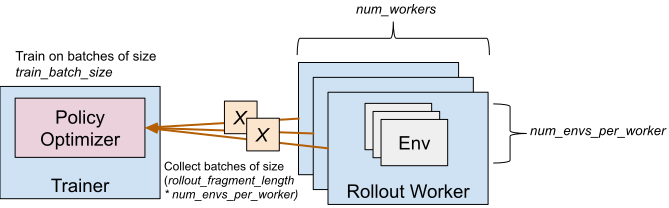
You can control the degree of parallelism used by setting the num_workers
hyperparameter for most algorithms. The Algorithm will construct that many
“remote worker” instances (see RolloutWorker class)
that are constructed as ray.remote actors, plus exactly one “local worker”, a RolloutWorker object that is not a
ray actor, but lives directly inside the Algorithm.
For most algorithms, learning updates are performed on the local worker and sample collection from
one or more environments is performed by the remote workers (in parallel).
For example, setting num_workers=0 will only create the local worker, in which case both
sample collection and training will be done by the local worker.
On the other hand, setting num_workers=5 will create the local worker (responsible for training updates)
and 5 remote workers (responsible for sample collection).
Since learning is most of the time done on the local worker, it may help to provide one or more GPUs
to that worker via the num_gpus setting.
Similarly, the resource allocation to remote workers can be controlled via num_cpus_per_worker, num_gpus_per_worker, and custom_resources_per_worker.
The number of GPUs can be fractional quantities (e.g. 0.5) to allocate only a fraction
of a GPU. For example, with DQN you can pack five algorithms onto one GPU by setting
num_gpus: 0.2. Check out this fractional GPU example here
as well that also demonstrates how environments (running on the remote workers) that
require a GPU can benefit from the num_gpus_per_worker setting.
For synchronous algorithms like PPO and A2C, the driver and workers can make use of
the same GPU. To do this for an amount of n GPUS:
gpu_count = n
num_gpus = 0.0001 # Driver GPU
num_gpus_per_worker = (gpu_count - num_gpus) / num_workers
If you specify num_gpus and your machine does not have the required number of GPUs
available, a RuntimeError will be thrown by the respective worker. On the other hand,
if you set num_gpus=0, your policies will be built solely on the CPU, even if
GPUs are available on the machine.
Specifying Experimental Features#
RLlib Scaling Guide#
Here are some rules of thumb for scaling training with RLlib.
If the environment is slow and cannot be replicated (e.g., since it requires interaction with physical systems), then you should use a sample-efficient off-policy algorithm such as DQN or SAC. These algorithms default to
num_workers: 0for single-process operation. Make sure to setnum_gpus: 1if you want to use a GPU. Consider also batch RL training with the offline data API.If the environment is fast and the model is small (most models for RL are), use time-efficient algorithms such as PPO, IMPALA, or APEX. These can be scaled by increasing
num_workersto add rollout workers. It may also make sense to enable vectorization for inference. Make sure to setnum_gpus: 1if you want to use a GPU. If the learner becomes a bottleneck, multiple GPUs can be used for learning by settingnum_gpus > 1.If the model is compute intensive (e.g., a large deep residual network) and inference is the bottleneck, consider allocating GPUs to workers by setting
num_gpus_per_worker: 1. If you only have a single GPU, considernum_workers: 0to use the learner GPU for inference. For efficient use of GPU time, use a small number of GPU workers and a large number of envs per worker.Finally, if both model and environment are compute intensive, then enable remote worker envs with async batching by setting
remote_worker_envs: Trueand optionallyremote_env_batch_wait_ms. This batches inference on GPUs in the rollout workers while letting envs run asynchronously in separate actors, similar to the SEED architecture. The number of workers and number of envs per worker should be tuned to maximize GPU utilization. If your env requires GPUs to function, or if multi-node SGD is needed, then also consider DD-PPO.
In case you are using lots of workers (num_workers >> 10) and you observe worker failures for whatever reasons, which normally interrupt your RLlib training runs, consider using
the config settings ignore_worker_failures=True, recreate_failed_workers=True, or restart_failed_sub_environments=True:
ignore_worker_failures: When set to True, your Algorithm will not crash due to a single worker error but continue for as long as there is at least one functional worker remaining.
recreate_failed_workers: When set to True, your Algorithm will attempt to replace/recreate any failed worker(s) with newly created one(s). This way, your number of workers will never decrease, even if some of them fail from time to time.
restart_failed_sub_environments: When set to True and there is a failure in one of the vectorized sub-environments in one of your workers, the worker will try to recreate only the failed sub-environment and re-integrate the newly created one into your vectorized env stack on that worker.
Note that only one of ignore_worker_failures or recreate_failed_workers may be set to True (they are mutually exclusive settings). However,
you can combine each of these with the restart_failed_sub_environments=True setting.
Using these options will make your training runs much more stable and more robust against occasional OOM or other similar “once in a while” errors on your workers
themselves or inside your environments.
Debugging RLlib Experiments#
Gym Monitor#
The "monitor": true config can be used to save Gym episode videos to the result dir. For example:
rllib train --env=PongDeterministic-v4 \
    --run=A2C --config '{"num_workers": 2, "monitor": true}'

# videos will be saved in the ~/ray_results/<experiment> dir, for example
openaigym.video.0.31401.video000000.meta.json
openaigym.video.0.31401.video000000.mp4
openaigym.video.0.31403.video000000.meta.json
openaigym.video.0.31403.video000000.mp4
Eager Mode#
Policies built with build_tf_policy (most of the reference algorithms are)
can be run in eager mode by setting the
"framework": "tf2" / "eager_tracing": true config options or using
rllib train --config '{"framework": "tf2"}' [--trace].
This will tell RLlib to execute the model forward pass, action distribution,
loss, and stats functions in eager mode.
Eager mode makes debugging much easier, since you can now use line-by-line
debugging with breakpoints or Python print() to inspect
intermediate tensor values.
However, eager can be slower than graph mode unless tracing is enabled.
Using PyTorch#
Algorithms that have an implemented TorchPolicy, will allow you to run
rllib train using the command line --framework=torch flag.
Algorithms that do not have a torch version yet will complain with an error in
this case.
Episode Traces#
You can use the data output API to save episode traces
for debugging. For example, the following command will run PPO while saving episode
traces to /tmp/debug.
rllib train --run=PPO --env=CartPole-v1 \
    --config='{"output": "/tmp/debug", "output_compress_columns": []}'

# episode traces will be saved in /tmp/debug, for example
output-2019-02-23_12-02-03_worker-2_0.json
output-2019-02-23_12-02-04_worker-1_0.json
Log Verbosity#
You can control the log level via the "log_level" flag. Valid values are “DEBUG”,
“INFO”, “WARN” (default), and “ERROR”. This can be used to increase or decrease the
verbosity of internal logging. You can also use the -v and -vv flags.
For example, the following two commands are about equivalent:
rllib train --env=PongDeterministic-v4 \
    --run=A2C --config '{"num_workers": 2, "log_level": "DEBUG"}'

rllib train --env=PongDeterministic-v4 \
    --run=A2C --config '{"num_workers": 2}' -vv
The default log level is WARN. We strongly recommend using at least INFO
level logging for development.
Stack Traces#
You can use the ray stack command to dump the stack traces of all the
Python workers on a single node. This can be useful for debugging unexpected
hangs or performance issues.
Next Steps#
To check how your application is doing, you can use the Ray dashboard.