(serve-autoscaling)=
# Ray Serve 自动扩缩
Each [Ray Serve deployment](serve-key-concepts-deployment) has one [replica](serve-architecture-high-level-view) by default. This means there is one worker process running the model and serving requests. When traffic to your deployment increases, the single replica can become overloaded. To maintain high performance of your service, you need to scale out your deployment.
## Manual Scaling
Before jumping into autoscaling, which is more complex, the other option to consider is manual scaling. You can increase the number of replicas by setting a higher value for [num_replicas](serve-configure-deployment) in the deployment options through [in place updates](serve-inplace-updates). By default, `num_replicas` is 1. Increasing the number of replicas will horizontally scale out your deployment and improve latency and throughput for increased levels of traffic.
```yaml
# Deploy with a single replica
deployments:
- name: Model
num_replicas: 1
# Scale up to 10 replicas
deployments:
- name: Model
num_replicas: 10
```
## Autoscaling Basic Configuration
Instead of setting a fixed number of replicas for a deployment and manually updating it, you can configure a deployment to autoscale based on incoming traffic. The Serve autoscaler reacts to traffic spikes by monitoring queue sizes and making scaling decisions to add or remove replicas. Configure it by setting the [autoscaling_config](../serve/api/doc/ray.serve.config.AutoscalingConfig.rst) field in deployment options. The following is a quick guide on how to configure autoscaling.
* **target_num_ongoing_requests_per_replica** is the average number of ongoing requests per replica that the Serve autoscaler will try to ensure. Set this to a reasonable number (for example, 5) and adjust it based on your request processing length (the longer the requests, the smaller this number should be) as well as your latency objective (the shorter you want your latency to be, the smaller this number should be).
* **max_concurrent_queries** (not in autoscaling config) is the maximum number of ongoing requests allowed for a replica. Set this to a value ~20-50% greater than `target_num_ongoing_requests_per_replica`. Note this is not part of the autoscaling config since it is relevant to all deployments, but it is important to set it relative to the target value if autoscaling is turned on for your deployment.
* **min_replicas** is the minimum number of replicas for the deployment. Set this to 0 if there are long periods of no traffic and some extra tail latency during upscale is acceptable. Otherwise, set this to what you think you need for low traffic.
* **max_replicas** is the maximum number of replicas for the deployment. Set this to ~20% higher than what you think you need for peak traffic.
An example deployment config with autoscaling configured would be:
```yaml
- name: Model
max_concurrent_queries: 14
autoscaling_config:
target_num_ongoing_requests_per_replica: 10
min_replicas: 0
max_replicas: 20
```
These guidelines are a great starting point. If you decide to further tune your autoscaling config for your application, see [Advanced Ray Serve Autoscaling](serve-advanced-autoscaling).
(resnet-autoscaling-example)=
## Basic example
We go through an example of a synchronous workload that runs ResNet50. The application code and its autoscaling configuration are shown below. (Alternatively, see the second tab for specifying the autoscaling config through a YAML file) We set `target_num_ongoing_requests_per_replica = 1` because the ResNet model runs synchronously, and the goal is to keep the latencies low. Note that the deployment starts with 0 replicas.
::::{tab-set}
:::{tab-item} Application Code
```{literalinclude} doc_code/resnet50_example.py
:language: python
:start-after: __serve_example_begin__
:end-before: __serve_example_end__
```
:::
:::{tab-item} (Alternative) YAML config
```yaml
applications:
- name: default
import_path: resnet:app
deployments:
- name: Model
max_concurrent_queries: 5
autoscaling_config:
target_num_ongoing_requests_per_replica: 1
min_replicas: 0
initial_replicas: 0
max_replicas: 200
```
:::
::::
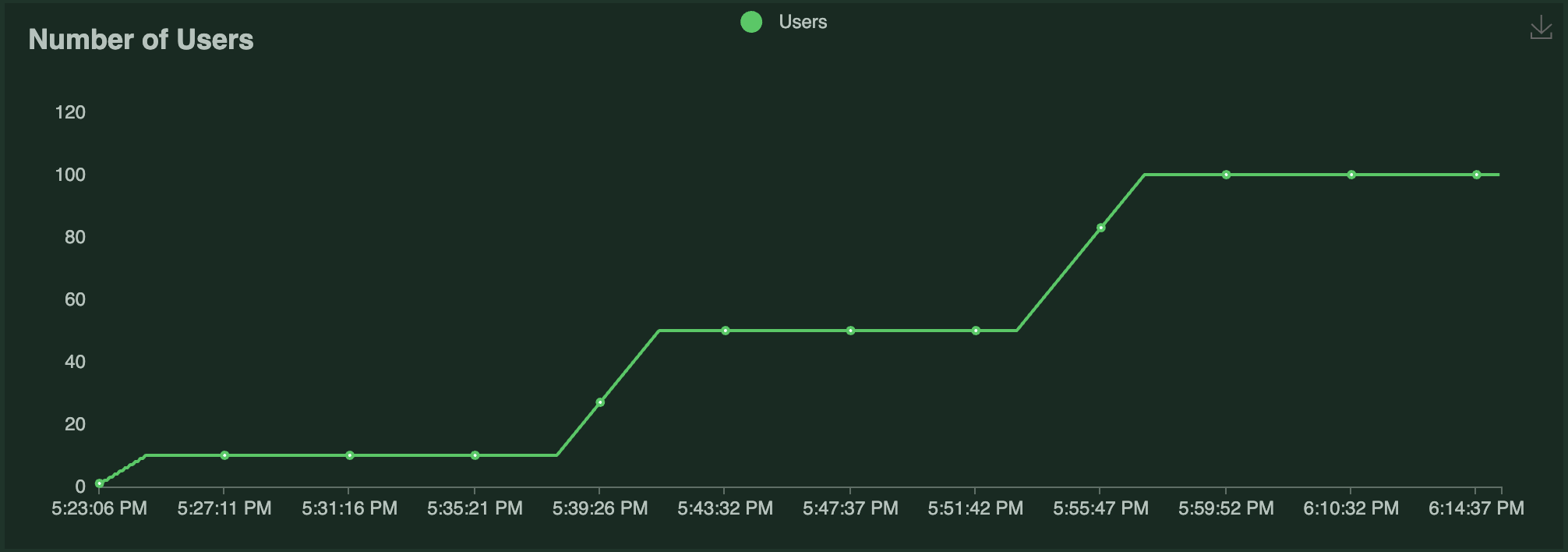
This example uses [Locust](https://locust.io/) to run a load test against this application. The Locust load test runs a certain number of "users" that ping the ResNet50 service, where each user has a [constant wait time](https://docs.locust.io/en/stable/writing-a-locustfile.html#wait-time-attribute) of 0. Each user (repeatedly) sends a request, waits for a response, then immediately sends the next request. The number of users running over time is shown in the following graph:
The results of the load test are as follows:
| | | |
| -------- | --- | ------- |
| Replicas | 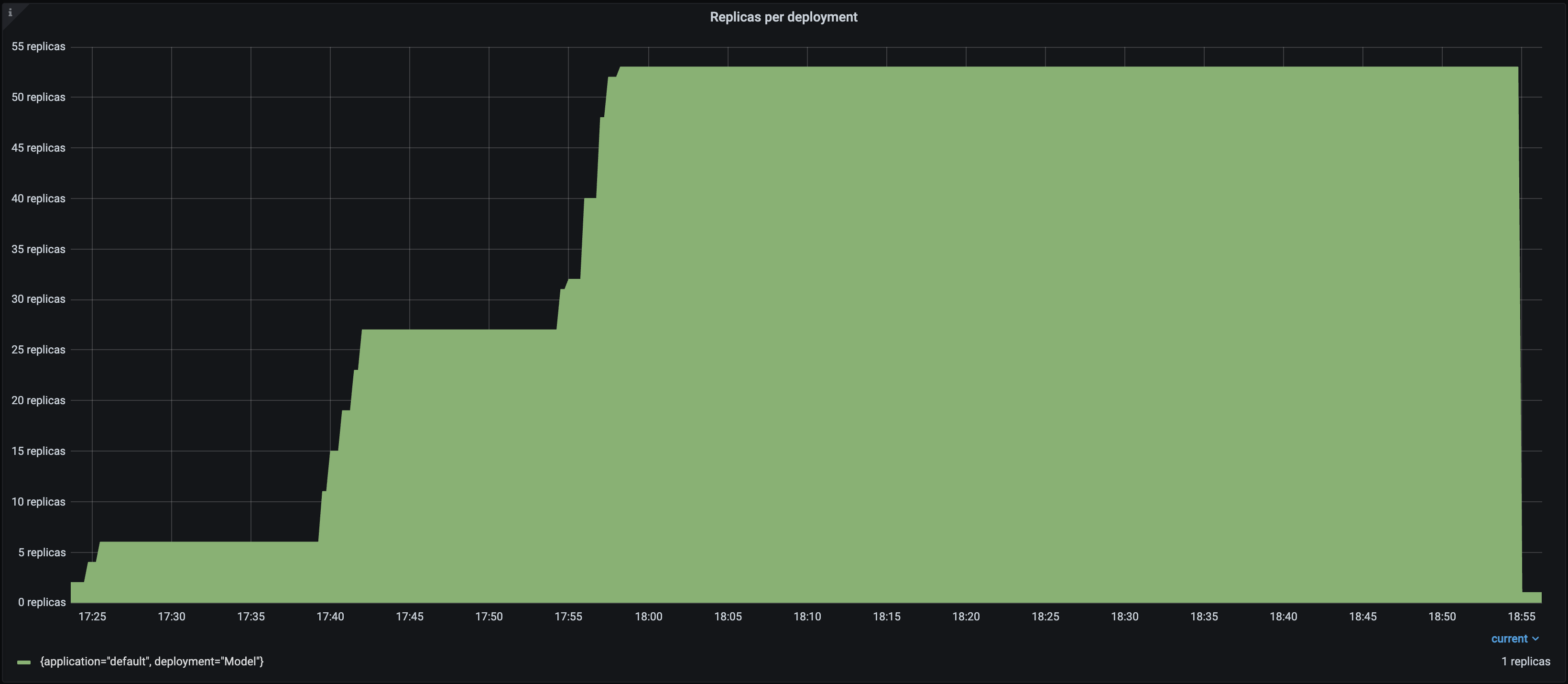 |
| QPS |
|
| QPS | 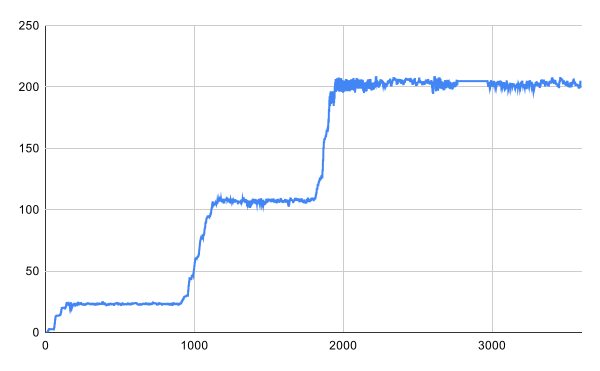 |
| P50 Latency |
|
| P50 Latency | 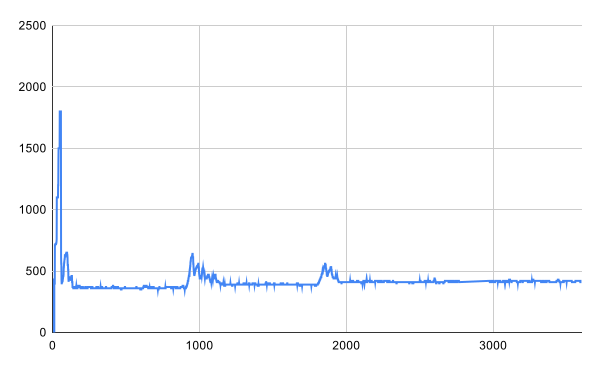 |
Notice the following:
- Each Locust user constantly sends a single request and waits for a response. As a result, the number of autoscaled replicas closely matches the number of Locust users over time as Serve attempts to satisfy the `target_num_ongoing_requests_per_replica=1` setting.
- The throughput of the system increases with the number of users and replicas.
- The latency briefly spikes when traffic increases, but otherwise stays relatively steady. The biggest latency spike happens at the beginning of the test, because the deployment starts with 0 replicas.
## Ray Serve Autoscaler vs Ray Autoscaler
The Ray Serve Autoscaler is an application-level autoscaler that sits on top of the [Ray Autoscaler](cluster-index).
Concretely, this means that the Ray Serve autoscaler asks Ray to start a number of replica actors based on the request demand.
If the Ray Autoscaler determines there aren't enough available resources (e.g. CPUs, GPUs, etc.) to place these actors, it responds by requesting more Ray nodes.
The underlying cloud provider then responds by adding more nodes.
Similarly, when Ray Serve scales down and terminates replica Actors, it attempts to make as many nodes idle as possible so the Ray Autoscaler can remove them. To learn more about the architecture underlying Ray Serve Autoscaling, see [Ray Serve Autoscaling Architecture](serve-autoscaling-architecture).
|
Notice the following:
- Each Locust user constantly sends a single request and waits for a response. As a result, the number of autoscaled replicas closely matches the number of Locust users over time as Serve attempts to satisfy the `target_num_ongoing_requests_per_replica=1` setting.
- The throughput of the system increases with the number of users and replicas.
- The latency briefly spikes when traffic increases, but otherwise stays relatively steady. The biggest latency spike happens at the beginning of the test, because the deployment starts with 0 replicas.
## Ray Serve Autoscaler vs Ray Autoscaler
The Ray Serve Autoscaler is an application-level autoscaler that sits on top of the [Ray Autoscaler](cluster-index).
Concretely, this means that the Ray Serve autoscaler asks Ray to start a number of replica actors based on the request demand.
If the Ray Autoscaler determines there aren't enough available resources (e.g. CPUs, GPUs, etc.) to place these actors, it responds by requesting more Ray nodes.
The underlying cloud provider then responds by adding more nodes.
Similarly, when Ray Serve scales down and terminates replica Actors, it attempts to make as many nodes idle as possible so the Ray Autoscaler can remove them. To learn more about the architecture underlying Ray Serve Autoscaling, see [Ray Serve Autoscaling Architecture](serve-autoscaling-architecture).